Showing posts with label KnowledgeBase. Show all posts

Thursday, 7 October 2010

KB: The following error occurred while saving message from the message box tracking spool. Class not registered

Today when I tried to save the tracked message in HAT, I had the following error:

The following error occurred while saving message from the message box tracking spool. Class not registered

The solution which worked for us is to restart the “Windows Management Instrumentation” service in the services tray.

HAT  uses WMI to query the MessageBox database. There can be two possible causes for this issue. Connectivity issue to the database or WMI. Since the message transmission is normal and its only the problem with HAT, we didn’t doubt the connectivity. Anyway to ensure that the things are right, we checked the MS-DTC setting as suggested here..http://msdn.microsoft.com/en-us/library/aa544733(CS.70).aspx .

Then WMI, in our case we have HP-Openview (like MOM/SCOM) to monitor the BizTalk environment and its agent service runs in BizTalk server to check the status of the server. We have some rules in Openview to monitor the status of the BizTalk artefacts like Orchestrations, receive locations , send ports etc. which uses WMI. Since Openview continuously polls for the BizTalk servers for the status the WMI services is battered. So for us recycling the WMI service (Windows Management Instrumentation) resolved the issue.

Wednesday, 6 October 2010

Errors List

In our day to day work, if we face any errors we either resolve the error by our experience or google it to find the correct solution. When you search for the correct solution often we find various potential solutions. So we go through each of them and apply the most suitable for our situation. Why not list the errors which I have encounters here. Instead of searching for the right solution why not first look here and see whether these solution which I have used sometime earlier when I had errors. This may not be useful to others, but might help me again in saving some time. So this is going to be a running list, I’ll update as when I encounter any errors.

Error The following error occurred while saving message from the message box tracking spool. Class not registered
Cause WMI service has been battered
Solution Recycle the “Windows Management Instrumentation” service in the services tray
Reference http://indway-is.blogspot.com/2010/10/kb-following-error-occurred-while.html


Error Cannot load source/destination schema: “schema_name”. Either the file/type does not exist, or if a project dependency exists, the dependent project is not built
Cause For some reason the BizTalk designer loses the schema reference and it is a little hard trying to “trick” the designer into remembering the schema’s location
Solution Unload/load project of refresh the VS shell with the references.
Reference http://sandroaspbiztalkblog.wordpress.com/2010/04/26/biztalk-mapper-cannot-load-sourcedestination-schema/

Error

Error <<Error Number>> Exception Caught: Mapper Compiler: Functoid not found: guid (<<GUID>>) with functoid id (<<functiod ID>>)

Cause For some reason the BizTalk designer loses the schema reference and it is a little hard trying to “trick” the designer into remembering the schema’s location
Solution Copy the custom functiod’s assembly to Drive:\Program Files\Microsoft BizTalk Server 2006\Developer Tools\Mapper
And GAC the custom functiod’s assembly
Reference http://social.msdn.microsoft.com/Forums/en-US/biztalkgeneral/thread/f9d43d64-84a3-4116-95cb-f4cca19a7d82

Error

sgen.exe exited with code 1

Cause When you build the solution in release mode. Exact cause??
Solution Remove the previous version of the assembly from the GAC
Reference http://chrissyblanco.blogspot.com/2006/10/sgenexe-exited-with-code-1.html

Monday, 1 February 2010

GAC it

Have you ever come across this error; I had an orchestration and a new requirement to update the orchestration with the BRE came in. After developing the orchestration, built the solution and deployed it in the test server. But the new code (executing the rule through Call Rule shape) didn’t reflect in the output. When I opened the orchestration debugger, there was a strange behaviour of the control flow. The control flow just jumped over the new code –the Call Rules shape, as shown in the below picture.

clip_image002

I have checked everything, and then later found that it’s because of the build error. When creating the executable for the application in the BizTalk administrator console, I have not added the updated assemblies in the “Resources” folder. This caused the mismatch to the User interface (UI) of the orchestration to the code behind of the orchestration. UI had reflected the newer version of the code but not the code behind!!!

Then created a new build, by properly including the updated assemblies in the “Resources” folder and GACed the updated assemblies. It worked as expected. So lesson leant is, do the basic things properly -“GAC IT”.

clip_image004

Tuesday, 26 January 2010

KB: Errors while configuring SQLXML

This post is just a knowledge base reference for me with the issues I have encountered while configuring the SQLXML.

We use SQLXML to execute the SQL query and display the xml document in the web browser.

(As part of the BizTalk BAM portal, users can see the actual message being processed by BizTalk. For example on clicking a link “Original message” in BAM portal, the actual message which is being processed by BizTalk to track the data for BAM has to be shown in the portal. This message(XML) can be retrieved from BAMPrimaryImport database. On clicking the link(Original message) we post the URL (“http://webserver/MsgView?sql=select%20LongReferenceData%20from%20dbo.bam_HireExtension_AllRelationships%20where%20ActivityID='18271dc1-6cd6-4b44-a2db-0bc37b2926c1'%20and%20ReferenceType='Message” ) which executes the SQL query contained in it as part of the querystring. Though this approach is prone to SQL injections, this is just a quick and dirty way to get the work done-The above description may be irrelevant to others, but will remind me the scenario where I have used SQLXML)

To setup the SQLXML, follow the instructions as in:http://sqlxml.org/faqs.aspx?faq=97

The steps in the above URL create a virtual directory in IIS. The only configuration change it performs to the default virtual directory is, mapping to the “sqlis3.dll” from C:\Program Files\Common Files\System\Ole DB directory.
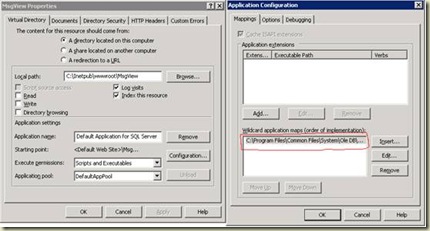
clip_image002

Apparently it just performs simple steps with the virtual directory setting. But it is strictly suggested not to create the above using the IIS wizard, rather do it using the SQLXML wizard.
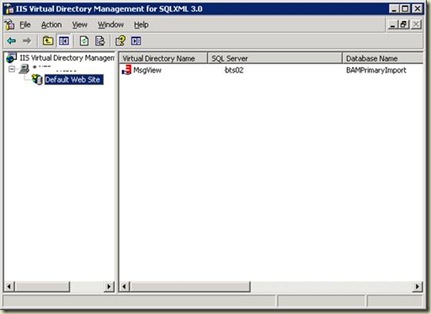
clip_image004

After configuring the virtual directory, when I executed the above query in the web browser, I received the following errors.

Error 1:

HResult: 0x80046000
Source: Microsoft SQL isapi extension
Description: Invalid connection settings: access denied
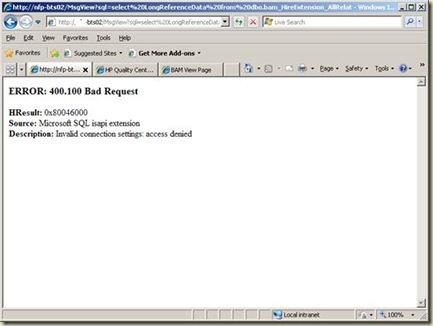
clip_image006

This error is due to the invalid SQL user credentials supplied when executing the query by using the virtual directory configured in the above steps.

Follow the instructions from Microsoft to solve the issue: http://support.microsoft.com/kb/820874/en-us

What I did was, created a separate login in SQL Server (Under Security à Logins) and provided this newly created SQL-User in the SQLXML configuration as specified in the article.

After the above, I received the

Error 2:

“Login failed for user ‘UserNameJustCreated’. The password of the account must be changed.”

Then I executed the following query

ALTER LOGIN UserNameJustCreated

WITH PASSWORD = 'password123',

CHECK_POLICY = OFF,

CHECK_EXPIRATION = OFF

Then I had the following error

Error 3:

The CHECK_POLICY and CHECK_EXPIRATION options cannot be turned OFF when MUST_CHANGE is ON

Executed the following to solve this error

ALTER LOGIN UserNameJustCreated WITH PASSWORD = 'password123'

GO

ALTER LOGIN UserNameJustCreated WITH

      CHECK_POLICY = OFF,

      CHECK_EXPIRATION = OFF;

(So I should have not executed the query as specified in the Error-2 section)

Then when I executed the SQL query hoping it would work, but I received another error

Error 4:

XML document must have a top level element. Error processing resource 'http://nfp-util01/MsgView?sql=select%20LongReference...

clip_image008

To know the exact error, select “View Source”  option and following is the error:

<?MSSQLError HResult="0x80040e09" Source="Microsoft OLE DB Provider for SQL Server" Description="The SELECT permission was denied on the object 'bam_HireExtension_AllRelationships', database 'BAMPrimaryImport', schema 'dbo'."?>

So the error was, it required the execute permission for the SQL-user (UserNameJustCreated) I have created in the one of the above step. Gave the execute permission, then I can see the XML in the browser as a sweety J
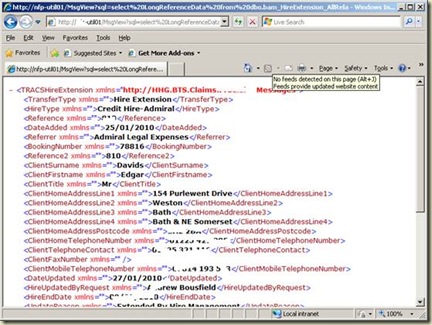
clip_image010

Thursday, 7 January 2010

BizTalk (BRE)Business Rules Engine “Failed to Load” error

One of the common error, we would encounter while working with BRE –Business Rules Engine is “Failed to Load”. Most possible cause for this error is the reference assembly is missing in GAC. It’s obvious to identify this cause, as the reason is given very descriptive as shown.

I had this same issue, so GACed the missed the assembly, then reloaded the policy (either by pressing F5 or by physically re-loading the policy). But the error still persisted. Then it reminded me the IDE cache error we all would have encountered during the pipeline development. So the solution is “Just close and open the IDE-Visual Studio again”

clip_image002

I am sure this no-blogging error, but for me. As I have mentioned in my profile, this blog is a knowledge base repository for me, where I store all the things I learn at work so that I can reference latest. If its useful for you as well, I am happy otherwise you have the whole world of web to spend.