Showing posts with label BizTalk Server. Show all posts

Thursday, 7 October 2010

KB: The following error occurred while saving message from the message box tracking spool. Class not registered

Today when I tried to save the tracked message in HAT, I had the following error:

The following error occurred while saving message from the message box tracking spool. Class not registered

The solution which worked for us is to restart the “Windows Management Instrumentation” service in the services tray.

HAT  uses WMI to query the MessageBox database. There can be two possible causes for this issue. Connectivity issue to the database or WMI. Since the message transmission is normal and its only the problem with HAT, we didn’t doubt the connectivity. Anyway to ensure that the things are right, we checked the MS-DTC setting as suggested here..http://msdn.microsoft.com/en-us/library/aa544733(CS.70).aspx .

Then WMI, in our case we have HP-Openview (like MOM/SCOM) to monitor the BizTalk environment and its agent service runs in BizTalk server to check the status of the server. We have some rules in Openview to monitor the status of the BizTalk artefacts like Orchestrations, receive locations , send ports etc. which uses WMI. Since Openview continuously polls for the BizTalk servers for the status the WMI services is battered. So for us recycling the WMI service (Windows Management Instrumentation) resolved the issue.

Monday, 6 September 2010

Which to use: BizTalk or SQL-Integration Service (SSIS) ?

I had a situation where I could have used any of these tools, but after some reading about the difference I have nailed down to use SSIS. So this blog is just a collection of my readings which helped me to differentiate and choose the product in my project.

BizTalk and SSIS are different tools and fit different scenarios.

SSIS is designed to move and manipulate very large amount of data over extremely high performance batch processing where BizTalk has been designed to move, process, validate, transform, and route low rate of transactions consisting of tiny amounts of business data

Use SSIS for:

Large ETL processes like de-batching the large CSV file into SQL database, or cleansing the large record before inserting in to database.

Batch Oriented Scenarios i.e. when the files need to be processed in specific time of the day as opposed to file needs to be processed as and when the files are available.

Use BizTalk:

When you have to do the Business Process Management (BPM). i.e. some business processes.

Near real-time scenarios i.e. as and when the files are available and it has to be processed.

SSIS and BizTalk can work together:

Though SSIS and BizTalk are used in different place depends on the scenario, it’s important to note that we can use SSIS with BizTalk. They can work together. For Example we have a project that would receive a batch of data once a day - containing 1000s of records. SSIS would receive the data, and then scrub the data (or validate the format). Once the data was acceptable, BizTalk would pick up each record and do the business processing.

BizTalk can do SQL-BULK insert but..

For bulk data processing we can use “SQL Bulk Load adapter ” available from http://www.biztalkgurus.com/blogs/biztalksyn/archive/2005/10/23/Processing-a-Large-Flat-File-Message-with-BizTalk-and-the-SqlBulkInsert-Adapter.aspx which can efficiently insert a large amount of data into SQL you are still stuck with the issues of transmitting the MessageBox database and the memory issues of dealing with really large messages.

Reference:

http://social.msdn.microsoft.com/forums/en-US/biztalkgeneral/thread/745b3b31-a83a-4629-bec2-49800e266c7e/

http://geekswithblogs.net/wmichel/archive/2007/04/11/111470.aspx

http://social.msdn.microsoft.com/forums/en-US/biztalkgeneral/thread/745b3b31-a83a-4629-bec2-49800e266c7e/

http://social.msdn.microsoft.com/forums/en-us/biztalkgeneral/thread/261D0FBC-EE91-4211-B811-F1D29A4A38D4

http://social.msdn.microsoft.com/Forums/en-GB/biztalkgeneral/thread/0338b17e-f9af-476c-984f-4982b65f230f

Tuesday, 9 February 2010

Installed BizTalk Server 2006 R2 – Service Pack 1 (SP1)

Installed the SP1 in our test server yesterday. It was pretty much a smooth ride with minor hurdles. I started off without reading the installation notes (as it’s in *.docx version and we still need to upgrade our MS-Word to latest version. We never felt the need of upgrading the MS-Word until now)

clip_image001clip_image002[6]

And these error messages didn’t provide much information to resolve. And same as the 13.6 MB log file.

Since our servers are not maintained properly in the recent time with regular reboots, I just rebooted the server and followed the instructions in the installation guide this time (Thought I would perform the installation properly this time, though the document doesn’t provide any clues for the above error).

I’ll emphasis on the followings to be considered before starting the installation:

  • SP1-Updates the database schemas:
    • All BizTalk servers in a server farm or group should be updated with the service pack as this updates the database schemas.
    • Backing-up the BizTalk databases are important (as it’s the case for every service pack). If you want to uninstall the SP1 later for any reason, you must restore the BizTalk Server databases with your backup.
  • I would always suggest to backup the master secret file.
  • All BizTalk Server 2006 R2 hotfixes that are currently installed on the computer will be automatically removed by the service pack installation. Some of the hotfixes are part of the service pack, where some are not. So keep a note of all the BizTalk hotfixes in your server before the installation and compare it against the hotfixes which are part of this service pack(http://support.microsoft.com/kb/974563). If any of your hotfixes are not part of this service pack, you can install the SP1-compatible version later..atleast your note will help you to double check later.

    clip_image003

  • Installing BizTalk Server 2006 R2 SP1 does not change the version number of your BizTalk Server installation. Ours is still “3.6.1404.0” after the service pack installation. (the service packs of previous versions of BizTalk server updates the product version number) So to identify its existence later, Go to “Add or Remove Programs” check the “Show updates” check box and look under “Microsoft BizTalk Server 2006 <<Developer Edition>>” 

Monday, 1 February 2010

GAC it

Have you ever come across this error; I had an orchestration and a new requirement to update the orchestration with the BRE came in. After developing the orchestration, built the solution and deployed it in the test server. But the new code (executing the rule through Call Rule shape) didn’t reflect in the output. When I opened the orchestration debugger, there was a strange behaviour of the control flow. The control flow just jumped over the new code –the Call Rules shape, as shown in the below picture.

clip_image002

I have checked everything, and then later found that it’s because of the build error. When creating the executable for the application in the BizTalk administrator console, I have not added the updated assemblies in the “Resources” folder. This caused the mismatch to the User interface (UI) of the orchestration to the code behind of the orchestration. UI had reflected the newer version of the code but not the code behind!!!

Then created a new build, by properly including the updated assemblies in the “Resources” folder and GACed the updated assemblies. It worked as expected. So lesson leant is, do the basic things properly -“GAC IT”.

clip_image004

Calling .NET assembly or any out-of-box static methods in BizTalk Rule Engine (BRE)

Calling .NET assembly or any out-of-box static methods (like System.String.Concat etc) in BizTalk Rule Engine (BRE) is a simple stuff; there is not much documentation available for beginners.

For example, if the rule is

If CustomerType = ‘new’

THEN

WelcomeMessage = String.Concat(“Hello”, CustomerName)

In the above example, I need to use the “System.String.Concat” method from out-of-box mscrolib assembly (or any of your custom method from your helper class).

Executing from Orchestration:

Option 1:

By default, the rule engine requires you to assert all the facts, before they ca be executed. So to execute the rule which contains the .NET assembly or any out-of-box static methods, we must create an instance of the helper class and pass it as a parameter to the rules engine in the Call Rules shape.

So for the above rule, in the Orchestration

  • Create an instance variable of type “String” - since we are calling the String.Concat() ( or the type of your helper class if you want to call a .NET assembly in your case)
  • Passing the instance type as the parameter: In the “CallRules Policy Configuration” window, select the above created variable in the “Parameter Name” column.clip_image002[3]

Option2:

Modify the BRE’s behaviour of expecting us to assert the facts by changing the value of the StaticSupport registry key as specified in MSDN (http://msdn.microsoft.com/en-gb/library/aa950269%28BTS.20%29.aspx).

Registry key for 32-bit OS: [HKEY_LOCAL_MACHINE\Software\Microsoft\BusinessRules\3.0 ]

Registry key for 64-bit OS:[HKEY_LOCAL_MACHINE/SOFTWARE/Wow6432Node/Microsoft/BusinessRules/3.0]

For testing the rule in the BRE composer:

Follow: http://geekswithblogs.net/nsthompson/articles/ClassAndBusinessRulesEngineIntegration.aspx

I have not used the steps mentioned by Neil (in the referenced blog). I am not sure how we will use the fact retriever specific for “integrating the .NET” if you already using a fact retriever in your rule for some other purpose like caching the datatable/database connectionstring.

I have always used a test orchestration which invoked my rule. Yes, I have to deploy my rule before using the rule in the orchestration. That's the major downside of this method.

Tuesday, 26 January 2010

KB: Errors while configuring SQLXML

This post is just a knowledge base reference for me with the issues I have encountered while configuring the SQLXML.

We use SQLXML to execute the SQL query and display the xml document in the web browser.

(As part of the BizTalk BAM portal, users can see the actual message being processed by BizTalk. For example on clicking a link “Original message” in BAM portal, the actual message which is being processed by BizTalk to track the data for BAM has to be shown in the portal. This message(XML) can be retrieved from BAMPrimaryImport database. On clicking the link(Original message) we post the URL (“http://webserver/MsgView?sql=select%20LongReferenceData%20from%20dbo.bam_HireExtension_AllRelationships%20where%20ActivityID='18271dc1-6cd6-4b44-a2db-0bc37b2926c1'%20and%20ReferenceType='Message” ) which executes the SQL query contained in it as part of the querystring. Though this approach is prone to SQL injections, this is just a quick and dirty way to get the work done-The above description may be irrelevant to others, but will remind me the scenario where I have used SQLXML)

To setup the SQLXML, follow the instructions as in:http://sqlxml.org/faqs.aspx?faq=97

The steps in the above URL create a virtual directory in IIS. The only configuration change it performs to the default virtual directory is, mapping to the “sqlis3.dll” from C:\Program Files\Common Files\System\Ole DB directory.

clip_image002

Apparently it just performs simple steps with the virtual directory setting. But it is strictly suggested not to create the above using the IIS wizard, rather do it using the SQLXML wizard.

clip_image004

After configuring the virtual directory, when I executed the above query in the web browser, I received the following errors.

Error 1:

HResult: 0x80046000
Source: Microsoft SQL isapi extension
Description: Invalid connection settings: access denied

clip_image006

This error is due to the invalid SQL user credentials supplied when executing the query by using the virtual directory configured in the above steps.

Follow the instructions from Microsoft to solve the issue: http://support.microsoft.com/kb/820874/en-us

What I did was, created a separate login in SQL Server (Under Security à Logins) and provided this newly created SQL-User in the SQLXML configuration as specified in the article.

After the above, I received the

Error 2:

“Login failed for user ‘UserNameJustCreated’. The password of the account must be changed.”

Then I executed the following query

ALTER LOGIN UserNameJustCreated

WITH PASSWORD = 'password123',

CHECK_POLICY = OFF,

CHECK_EXPIRATION = OFF

Then I had the following error

Error 3:

The CHECK_POLICY and CHECK_EXPIRATION options cannot be turned OFF when MUST_CHANGE is ON

Executed the following to solve this error

ALTER LOGIN UserNameJustCreated WITH PASSWORD = 'password123'

GO

ALTER LOGIN UserNameJustCreated WITH

      CHECK_POLICY = OFF,

      CHECK_EXPIRATION = OFF;

(So I should have not executed the query as specified in the Error-2 section)

Then when I executed the SQL query hoping it would work, but I received another error

Error 4:

XML document must have a top level element. Error processing resource 'http://nfp-util01/MsgView?sql=select%20LongReference...

clip_image008

To know the exact error, select “View Source”  option and following is the error:

<?MSSQLError HResult="0x80040e09" Source="Microsoft OLE DB Provider for SQL Server" Description="The SELECT permission was denied on the object 'bam_HireExtension_AllRelationships', database 'BAMPrimaryImport', schema 'dbo'."?>

So the error was, it required the execute permission for the SQL-user (UserNameJustCreated) I have created in the one of the above step. Gave the execute permission, then I can see the XML in the browser as a sweety J

clip_image010

Wednesday, 20 January 2010

Error: Exception has been thrown by the target of an invocation

In our BizTalk project, I have used a C# helper class, whose method uses Microsoft’s Enterprise Library to invoke a SQL-stored procedure. The SQL stored procedure does some data validation and raises errors for business validation errors using its RAISERROR keyword.

When our tester was testing the above application, they had this strange error

System.Reflection.TargetInvocationException: Exception has been thrown by the target of an invocation. ---> <<SQL Server’s error message>>

But the expected error is the <<SQL Server’s error message>> only  which has been appended wrongly with the strange error “System.Reflection.TargetInvocationException: Exception has been thrown by the target of an invocation”

After spending sometime, I found out that the problem could be due to “Instrumentation” in Enterprise Library. So I installed the “Instrumentation” from

Start -> All Programs -> Microsoft pattern & practices -> Enterprise Library 3.1 – May 2007-> Install Instrumentation

It solved the issue.

Saturday, 9 January 2010

Resources on testing with BizTalk Server

Michael Stephenson has shared his resources and reference on testing with BizTalk Server.

http://code.msdn.microsoft.com/BTSTestGuide

Thanks Michael.

Cheers

Thursday, 7 January 2010

Powershell providers for BizTalk Server

I was reading the latest edition of BizTalk Hotrod magazine, one interesting article which captured my eye was PowerShell provider for BizTalk developed by Maxime Labelle, Michel Hubert and Randal van Splunteren.(Page 42 onwards: http://biztalkhotrod.com/Documents/Issue8_Q4_2009.pdf)

Microsoft also announced its out of box support to PowerShell for management tasks in its BizTalk Server 2009 R2 release which is expected this year. (http://www.microsoft.com/biztalk/en/us/roadmap.aspx#2009r2)

Interesting to see Microsoft’s effort to next generation technologies to replace scripting languages and batch files for the management task. The obvious benefits of PowerShell over the scripts and batch file is object oriented programming model and much better debugging facilities.

I am going to try the PowerShell provider for my BizTalk Server 2006 projects before Microsoft’s PowerShell providers in 2009 R2.

BizTalk (BRE)Business Rules Engine “Failed to Load” error

One of the common error, we would encounter while working with BRE –Business Rules Engine is “Failed to Load”. Most possible cause for this error is the reference assembly is missing in GAC. It’s obvious to identify this cause, as the reason is given very descriptive as shown.

I had this same issue, so GACed the missed the assembly, then reloaded the policy (either by pressing F5 or by physically re-loading the policy). But the error still persisted. Then it reminded me the IDE cache error we all would have encountered during the pipeline development. So the solution is “Just close and open the IDE-Visual Studio again”

clip_image002

I am sure this no-blogging error, but for me. As I have mentioned in my profile, this blog is a knowledge base repository for me, where I store all the things I learn at work so that I can reference latest. If its useful for you as well, I am happy otherwise you have the whole world of web to spend.

Monday, 27 April 2009

Friday, 13 February 2009

C# Generics works with BizTalk Server 2009 (Beta) :)

I have tried yesterday and it worked.  I am really one of the happiest persons to have C# Generics support in BizTalk.

Though Generics was introduced in Version 2.0 of C# and CLR, BizTalk till its version 2006 R2 doesn't support it. But now the story has changed. Yes, BizTalk Server 2009-Beta can support C# helper class with typed parameters i.e. Generics.

In the BizTalk Server version till 2006 R2, though we can't use the C# helper class which has Generics defined in it, we can utilise them indirectly by creating a wrapper class around them. By making this way, we can still abide the rules of BizTalk Server i.e. of not exposing the class with Generics in it directly. But now in BizTalk Server 2009 Beta, we don't have to search for any workaround for using Generics.

Lets see a real time example where we will use C# Generics with BizTalk. I have a database table called "Employee" which contains Employee details (obviously). And as part of the message processing in BizTalk I have to retrieve the Employee name for the given Employee ID. So I'll use a C# helper class to retrieve the EmployeeName for the EmployeeID which will be passed in as a input parameter to a method in it. I have to design the C# helper project in a object-oriented way something like

image

In the EmployeesDataProvider class, I have defined the Generics as..

public  List<Employee> employeeList = new List<Employee>();

to populate it with the result of "select * from Employee" then I'll add this to cache. So next time I'll populate the "employeeList" only if the cache is NULL. Thus avoids the database trips. And use Generics search functionality to get the result from the "employeeList" collection as..

Employee cusTemp = employeeList.Find(delegate(Employee _cus)
           {
               if (_cus.EmployeeID == strEmployeeID)
               {
                   return true;

               }
               return false;
           });

           if (cusTemp != null)
           {
               ret = cusTemp.EmployeeName.ToString();
           }

So the functionality of my helper class is:

Build the EmployeesList (typed class with Generics)from database if its not in the cache / other wise use the cached employee list and use the Generics's Find method to get the EmployeeName for the given EmployeeID.

Now in to BizTalk Server (till 2006 R2), inside the Orchestration's expression shape you may not be able to initiate the EmployeesDataProvider class. Reason being, this class has got the "Generics" type declaration. But now, the same works in BizTalk Sever 2009. Here you can see in BizTalk Server 2009-Beta, the class containing Generics recognised.

GenericsWorking

Download source code for "Generics in BizTalk Server 2009": http://cid-01845bf64da73117.skydrive.live.com/self.aspx/INDWAY-Integration%20Services/TryGenerics.zip

Thanks to Connected Systems for providing us this feature.


Cheers

M.R.ASHWINPRABHU

Friday, 6 February 2009

BizTalk poster updated for BizTalk Server 2009

Microsoft technical editors have updated the BizTalk Server poster for their new BizTalk Server 2009.

http://blogs.msdn.com/nabeelp/archive/2009/02/04/biztalk-posters-updated-for-biztalk-2009.aspx

BizTalk Server 2004: Mainstream support expires soon

Microsoft's mainstream support for BizTalk Server 2004 applications is expiring on 14/07/2009. But the extended support is available till 08/07/2014. In the extended support phase

  • Microsoft will not provide new non-security hotfixes.For those who require new non-security hotfixes during the Extended Support phase, they have to enrol themselves to the Extended Hotfix Support (EHS).
  • “No-charge” support options are no longer available.This means that customers will need to open paid support cases (such as Premier, Pro or Pay Per Incident cases) to obtain support for their product.For Premier and Pro customers who already open paid cases with Microsoft will notice little difference in the support during extended support phase.
Support Provided

Till 14/07/2009(Mainstream support)

Till 08/07/2014(Extended Support )

Paid support (per-incident, per hour, and others)

Yes

Yes

Security update support

Yes

Yes

Non-security hotfix support

Yes

Requires extended hotfix agreement, purchased within 90 days of mainstream support ending.

No-charge incident support

Yes

No

Warranty claims

Yes

No

Design changes and feature requests

Yes

No

Product-specific information that is available by using the online Microsoft Knowledge Base

Yes

Yes

Product-specific information that is available by using the Support site at Microsoft Help and Support to find answers to technical questions

Yes

Yes

BizTalk Server - Product Life cycle: http://support.microsoft.com/lifecycle/search/default.aspx?sort=PN&alpha=BizTalk+Server+2004&Filter=FilterNO

Microsoft is scheduled to release BizTalk Server 2009 by later this year (Its beta is already available for public:http://indway-is.blogspot.com/2008/12/biztalk-server-2009-beta-for-public.html). So if you plan to migrate your BizTalk server 2004 application, its advisable to wait for some time till the release of 2009 and migrate to 2009 to utilise the longer Microsoft support. And there is no direct upgrade path from BizTalk Server 2004 to BizTalk Server 2009. BizTalk server 2009 supports direct upgrade only from 2006 or 2006 R2.

Cheers

M.R.ASHWINPRABHU


Monday, 26 January 2009

BizTalk 2006 Documenter

Documentation is always an important part of any project. Automating the documentation hasn’t been achieved its excellence. But various documentation tools are available for public use which will help us to create a decent base. One of them is Darren Jefford’s BizTalk documenter.

Download BizTalk 2006 Documenter:

http://www.codeplex.com/BizTalkDocumenter/

I have always found this tool handy whenever I have been asked to work on an existing BizTalk solution. For instance lets say you have been asked to work on an existing BizTalk Solution which comprises of 40 projects!!! Navigating through its reference projects, to understand the flow is always a painful process. I always use this tool to generate a help-file out of these BizTalk projects.

In another project, since my client was very much satisfied with the document generated by this tool, I have configured to run this tool as part of automated build (used MS-Build). so whenever our project changes, the project document will also be updated accordingly.

This tool is simple self-describing tool. But I have faced some problems initially and the solution is as follows.

  • Make sure that you have the HTML-Help compiler when you have opt to generate HTML-Help version (MS-Word version is also available) of document. Download the HTML-compiler from here:

http://www.microsoft.com/downloads/details.aspx?familyid=00535334-c8a6-452f-9aa0-d597d16580cc&displaylang=en

  • Unable to locate the help compiler executable

clip_image002

Ensure the “HelpComplieLocation” variable is assigned to the exact path of the Help compiler “*.exe” file in the BizTalkDocumenter.exe.config file

  • There was an error generating the XML document.

clip_image004

This error is due to tracking enabled in any of your send port. Just for documentation sake disables the tracking in your send port and rerun the tool again.

  • “Item has been already added. Key in dictionary: 'xxx.xxx.xxx.Orchestration' Key being added:'xxx.xxx.xxx.Orchestration'”

In rare case this error might occur. Ensure you have selected only the required BizTalk Applications in “Select Documentation Type”.

Sunday, 25 January 2009

Host, Host Instance, Host Group

Recently I have met some developers who were new to BizTalk. They were having very vague idea about BizTalk host, host group and host instance. We all learnt this by experience but for a beginner, understanding the host model in BizTalk might take some time. So let me post an article which explains these for beginners.

Host:

The BizTalk host is a logical, process boundary for BizTalk artifacts like Adapters, Orchestrations, Send Ports, Receive Locations and Pipelines.

  • BizTalk Host is not a physical entity; it’s a logical boundary
  • We assign the host to Adapters and Orchestrations, Transport Types and its corresponding handlers to Send Ports and Receive Locations.

Ok, so what is the actual use of the BizTalk Host? These separate process boundaries (Host) enable us to create security boundaries and facilitate management.

Let's say that your company where the BizTalk application is going to be deployed is

·         Having different set of security policies for sending and receiving message from their stakeholders – by using different security certificates for receiving and sending any messages or by using different policies in their firewall.

·         Having different security access rights to receive/process/send – this can be achieved by providing different windows group to a host, which controls the access to the host and its associated host instance(s) to database and other resources

·         Having different set of throttling configurations for send and receive messages

·         More receive intensive where your messaging system receives more messages, then you can isolate the receive locations in a separate host.

Microsoft’s recommendation for the HOST model is to have separate Receiving, Sending and orchestration hosts both logically and physically. This model has been proved to be the most optimal configuration for achieving the highest throughput.

clip_image001

Based on the physical configuration and type of adapter hosted within, there are two types of hosts:

1.    In-process hosts.

2.    Isolated hosts.

In-Process host:

The logical process boundary which gets executed and managed within the runtime process of BizTalk Server engine.  

Isolated host:

The logical process boundary which gets executed and managed from outside the runtime process of BizTalk Server engine. In most of the cases, they run under IIS process boundary. Hence the adapters such as HTTP and SOAP (The adapters that runs outside of the normal BizTalk Server runtime process) are managed under isolated host.

Since the Isolated host exist outside the BizTalk environment, the BizTalk Administrator tool is not designed to show the status of the host (like Started/Stopped)  

Host Group:

Host group is nothing but a Windows-group which will be assigned to the host to control its associated host instance(s) access to the database and other resources.

When you initially configure the host, you will provide a Windows group which will be used to control access of the host and its associated host instance(s) to database and other resources

Make sure that the Windows-group which will be assigned to the host has got the “Login access” to the BizTalk-SQL databases like:

  • BizTalkMgmtDb
  • BizTalkMsgBoxDb
  • BAMPrimaryImport
  • BizTalkDTADb
  • BizTalkRulesEngineDb

A host group requires the following privileges:

  • It must be a member of the BTS_HOST_USERS SQL Server role in the following databases:

    • Configuration
    • MessageBox
    • Rule Engine
    • Tracking
    • BAM Primary Import

  • It must be a member of the BTS_<<in-process host name>>_USERS SQL Server role for the MessageBox database

  • It must be a member of the BAM_EVENT_WRITER SQL Server role in the BAM Primary Import database.

If you use the Configuration Wizard to create hosts, and if you specify a local Windows group for the hosts, the Configuration Wizard automatically creates two Windows groups. The default names of these groups are the BizTalk Application Users group and the BizTalk Isolated Host Users group.

clip_image003

Host Instance:

A host instance is a run-time instance of host in a server. Host instance runs within the security boundaries of the host and executes message processing on each machine belonging to the host.

The host instance executes in the associated server inheriting the logical boundary defined in the host.

When you create a host instance of a host associated with the host group, the host instance inherits the database privileges of the host group.

clip_image004

Thursday, 22 January 2009

BAM in Depth for Developers

I have been reading an excellent white paper on BAM, I thought I should share this info. This white paper provides a deep, low-level review of how BAM works and how BAM can be extended. This white paper can be found at:

http://msdn.microsoft.com/en-us/library/dd320628.aspx

Cheers
M.R.ASHWINPRABHU

LoadGen-Testharness for SOAP transport

I have been using the LoadGen in the recent weeks. I have been using it as part of creating test harness for performance and stress testing in the BizTalk applications. I thought I’ll write a post about configuring LoadGen for SOAP transport. 

A sample scenario: I have a WebService (which I have been using it with my SOAP adapter), which will initiate the message flow in BizTalk. I would like to create a harness which will simulate the source application to post the request message and to receive the response message back from the WebService. 

Steps involved:

  1. Create the WebService.
  2. Configure the LoadGen.
  3. Create the source file which LoadGen use to post).
  4. Execute the LoadGen.

1. Create WebService

Following is the sample webservice to be used for the testing: 
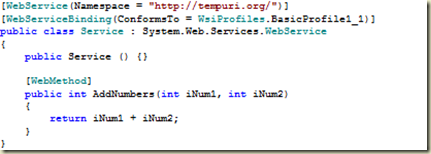
image

Build and complie the webservice project. Access the webservice from the browser. Browse to the page where you can see the SOAP message formats. Following is the SOAP Request message for the above webmethod.  

image

2.Configure the LoadGen.

 Download and install the latest version of LoadGen (2007) from the below Microsoft link (http://www.microsoft.com/downloads/details.aspx?familyid=C8AF583F-7044-48DB-B7B9-969072DF1689&displaylang=en)

 Open the sample configuration file from <<installation drive>>\ LoadGen\ConfigFiles\ConsoleConfigFiles  

In this case since we are going to test the webservice which inturn return the response, we will select the “SoapToSoapTwoWayLG.xml” – it’s for SOAP two-way transport. In the config file, the root element <LoadGenFramework> contains two key elements  

  1. <CommonSection>
  2. <Section>

<CommonSection> element configures the default settings common to all LoadGen tasks in a LoadGen scenario. Some of the key settings are  

<NumThreadsPerSection>: Number of concurrent threads that LoadGen will use to send messages.

<SleepInterval>:Interval between the subsequent threads.

<LotSizePerInterval>: Number of messages that will be sent as a lot in each thread.

<RetryInterval>: Interval time to reattempt in case of failure.

<OptimizeLimitFileSize>: If file size becomes greater than the specified limit (in bytes), LoadGen will perform streaming for optimization.  

<Transport>: Transport protocol to be used for the LoadGen tasks. In this case SOAP.  

<Section> element configures the setting specific to a LoadGen task.

          <SrcFilePath>: Path of the source file for a LoadGen task

<DstLocation> Element contains the configuration settings for the LoadGen transport component.

<URL>: Specifies the URL of the WebService.

<SOAPHeader>: Specifies the SOAP action header for the request message to deliver.

<SOAPPrefixEnv>: Specifies the start tags of the SOAP envelope and the SOAP body.

<SOAPPostfixEnv>: Specifies the end tags of the SOAP envelope and the SOAP body.

<ResponseMsgPath>: Specifies the directory location for the response message.  

Coming back to configuring our sample webservice in LoadGen configuration file, perform the following steps (We are going to refer the SOAP Request message):  

  • Specify the input file path for the LoadGen in <SrcFilePath>

image

  • Specify the WebService URL in <Section>\<DstLocation>\<Parameters>\<URL> element as

image

  • Specify the SOAPHeader in the format of "SOAPAction:[value]".

image

  • To specify the SOAPPrefixEnv, copy the start tags of SOAP envelope and the SOAP body in a text-editor from our example:

image

Replace the “<” with “&lt;” and “>” with “&gt;”, now we should have

image

Copy the above content and paste it in <SOAPPrefixEnv></SOAPPrefixEnv> element, like

 image

To specify the <SOAPPostfixEnv>, perform the similar replacements with the end tags of the SOAP envelope and SOAP body. Then we should have

 image

  • Specify the directory location for the response message in <ResponseMsgPath>

image

Following figure could help in easily identifying the LoadGen sections from the SOAP message
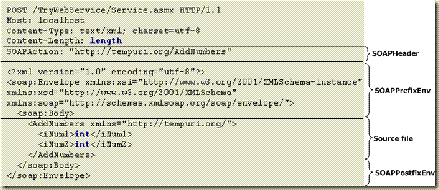
SOAPRequestMsg_To_LoadGen

<Click on the image to see the clearer view>

Create the Source file:

 While configuring the <SOAPPrefixEnv> and <SOAPPostfixEnv> elements in the LoadGen configuration, we have specified the start and end tags of the SOAP envelope and SOAP body. We have not used the actual body of the message. Now we will use this to create the source file for the LoadGen. Copy the SOAP body content and paste it in a text-editor with sample value in it. (I have saved the file as InputSrcFile.txt as specified in the <SrcFilePath>)

image

As per your test criteria, configure the <CommonSection> element.

I have configured it to 1 file in 1  thread per section to execute the try run

For the complete LoadGen Configuration file for this sample webservice (my skydrive folder location):

http://p9grea.bay.livefilestore.com/y1pVA4-qMhhNrBuLy7yUCv2AyVKjBHI8htB-3b-fwMopx11lrCuSDv9g91MP-3c9RiPJv5YIJmH1KodvcTNlSDwkQ/LGSOAPTwoway.xml

Execute the LoadGen:  

From the command prompt, navigate to the installation directory of the LoadGen and type “LoadGenConsole” with its only parameter, the name of the LoadGenConfiguration file  

[installation directory]\LoadGen\Bins>LoadGenConsole TryLGSOAPToSOAPTwoway.xml 

clip_image002

 If you want to enable tracing for your LoadGen (its very essential in my experience), Uncomment the follwing lines from your LoadGenConsole.exe.config file from “[Installation directory]\LoadGen\Bins\”  

image

After executing the LoadGen, check for the response in the directory specified in <ResponseMsgPath>